
Abandoned cart reminders: A simple way to recover lost sales
You know the feeling: someone visits your online store, finds a product they like, adds it to the cart, starts checkout, and then disappears.
No order. No payment. Just an unfinished cart sitting there.
For a small business owner, that can be frustrating. When you are the one taking product photos, writing descriptions, packing orders, answering emails, and trying to get people to your website in the first place, every almost-sale matters.
But an abandoned cart does not always mean the customer changed their mind. Sometimes they got distracted. Sometimes they wanted to check delivery costs. Sometimes they were comparing options. Sometimes they simply thought, “I’ll finish this later,” and then forgot.
That is why abandoned cart recovery reminders can be so useful. They give interested shoppers a simple way back to the products they already chose.
And with Mozello’s abandoned cart recovery feature, those reminders can be sent automatically.
Why shoppers leave without buying
Cart abandonment is a normal part of e-commerce. According to Baymard Institute, the average documented online shopping cart abandonment rate is around 70%. In simple terms, roughly 7 out of 10 online shopping carts are left unfinished.
That number may sound high, but it should not make small business owners panic. Even successful online stores deal with abandoned carts. The useful question is not “How do I stop this completely?” but “How do I bring some of these shoppers back?”
People leave carts for many reasons. Unexpected shipping costs are a common one. A checkout that feels too long or confusing can also make people give up, especially on mobile. Some shoppers hesitate when they are asked to create an account, while others want more clarity about delivery times, payment options, returns, or product details.
Then there is the most ordinary reason of all: people are busy. They shop while commuting, cooking, working, scrolling in the evening, or doing three things at once. They may like the product, but not complete the purchase in that moment.
So an abandoned cart is not always a “no.” Quite often, it is a “not now.”
Why abandoned carts are worth following up on
Someone who adds a product to the cart is not a random visitor anymore. They have found something they like, considered buying it, and taken the first step toward checkout.
That makes abandoned carts valuable.
For small businesses, getting people to visit an online store takes real work. You may be posting on social media, improving your SEO, running ads, writing newsletters, going to markets, or relying on word of mouth. When a visitor finally reaches the cart stage, it makes sense to give them an easy way to come back.
That is what abandoned cart recovery does. It reminds shoppers about the items they left behind and helps them return to finish the order.
The best part is that this follow-up does not have to be manual.
How Mozello’s abandoned cart recovery reminders work
Mozello’s abandoned cart recovery reminder feature helps online store owners automatically follow up with buyers who started checkout but did not complete the payment.
Instead of checking unfinished orders yourself or writing individual emails, Mozello can send reminder emails for you. The customer gets a helpful nudge, and you get another chance to recover a sale that might otherwise be forgotten.
In Mozello, you can enable and customize abandoned cart recovery reminders under Store → Store settings → E-mails.)
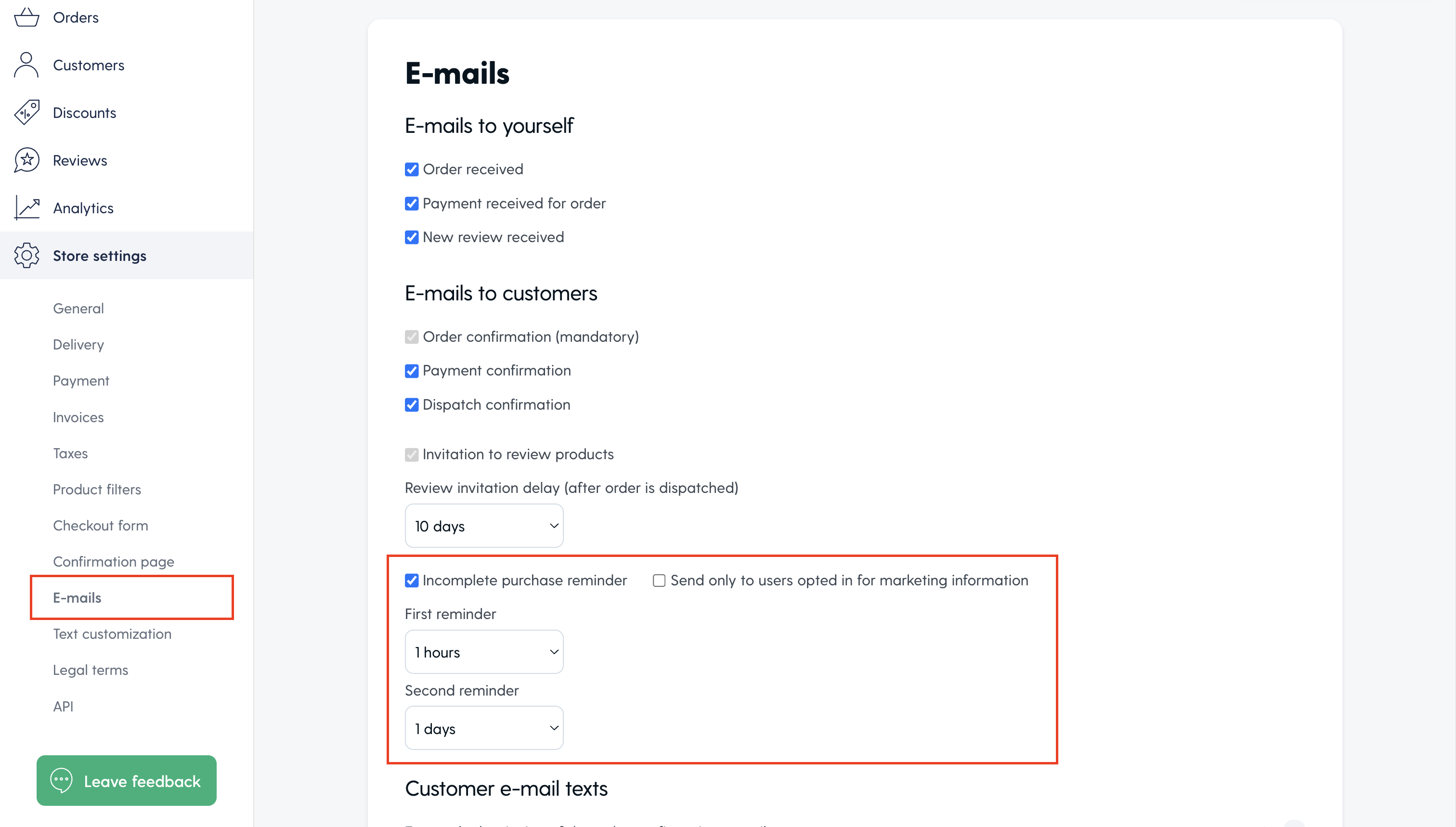
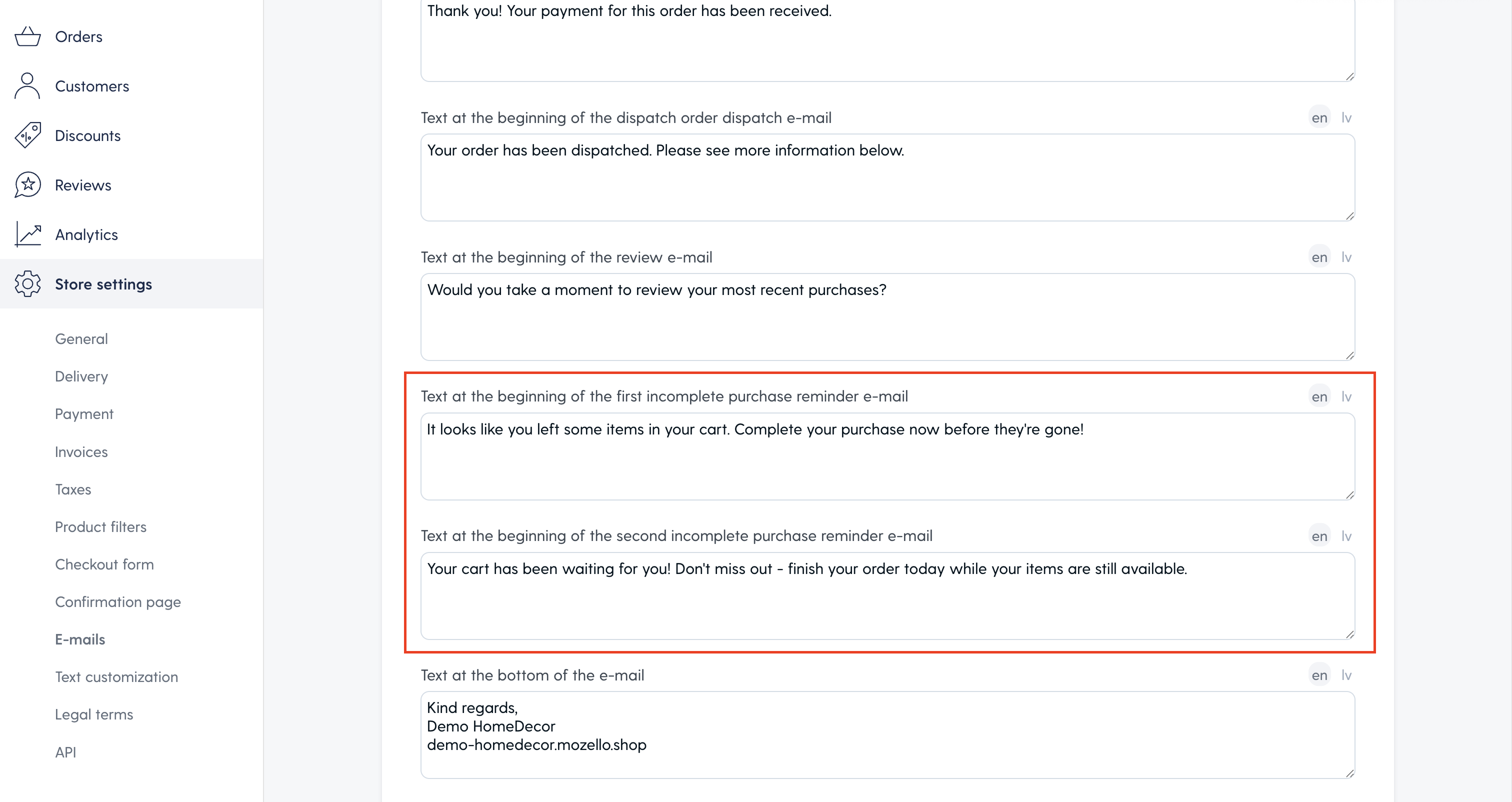
Once the feature is turned on, you can choose when the reminder emails are sent and customize the email text.
Mozello can send two abandoned cart reminder emails to buyers who did not complete their payment. For example, you might send the first reminder after one hour and the second one after one day. The reminder can also show the products left in the cart, including product images, so shoppers can quickly recognize what they selected and return to finish the order.
If you want to include a discount in the reminder, first create a discount code under Store → Discounts.
Then add the code manually to the Text at the beginning of the first incomplete purchase reminder e-mail or Text at the beginning of the second incomplete purchase reminder e-mail field.
The best part: The feature works for everyone as long as they entered their email address in the purchase form before leaving checkout. This is important because many online shoppers do not create an account before buying, especially if they are visiting your store for the first time. They may simply add products to the cart, start checkout, enter their contact details, and then decide whether to complete the order.
If the shopper leaves after entering their email address, Mozello can still send the abandoned cart reminder. In other words, the feature is not limited only to registered customers or returning users with accounts.
Before turning the reminders on, it is worth checking a few things:
- make sure the email text sounds like your business,
- the timing feels reasonable,
- your product images look good,
- if you use a discount code, that the code is active and still makes sense for your margins.
Abandoned cart recovery reminders are included in the Mozello Premium Pro plan. If you are planning to upgrade, you can currently use the code PREMIUMPRO5 for a lifetime 5% discount.
Where to check incomplete purchases in Mozello
You can check unfinished orders in your Mozello store admin under Store → Orders → Incomplete purchases.
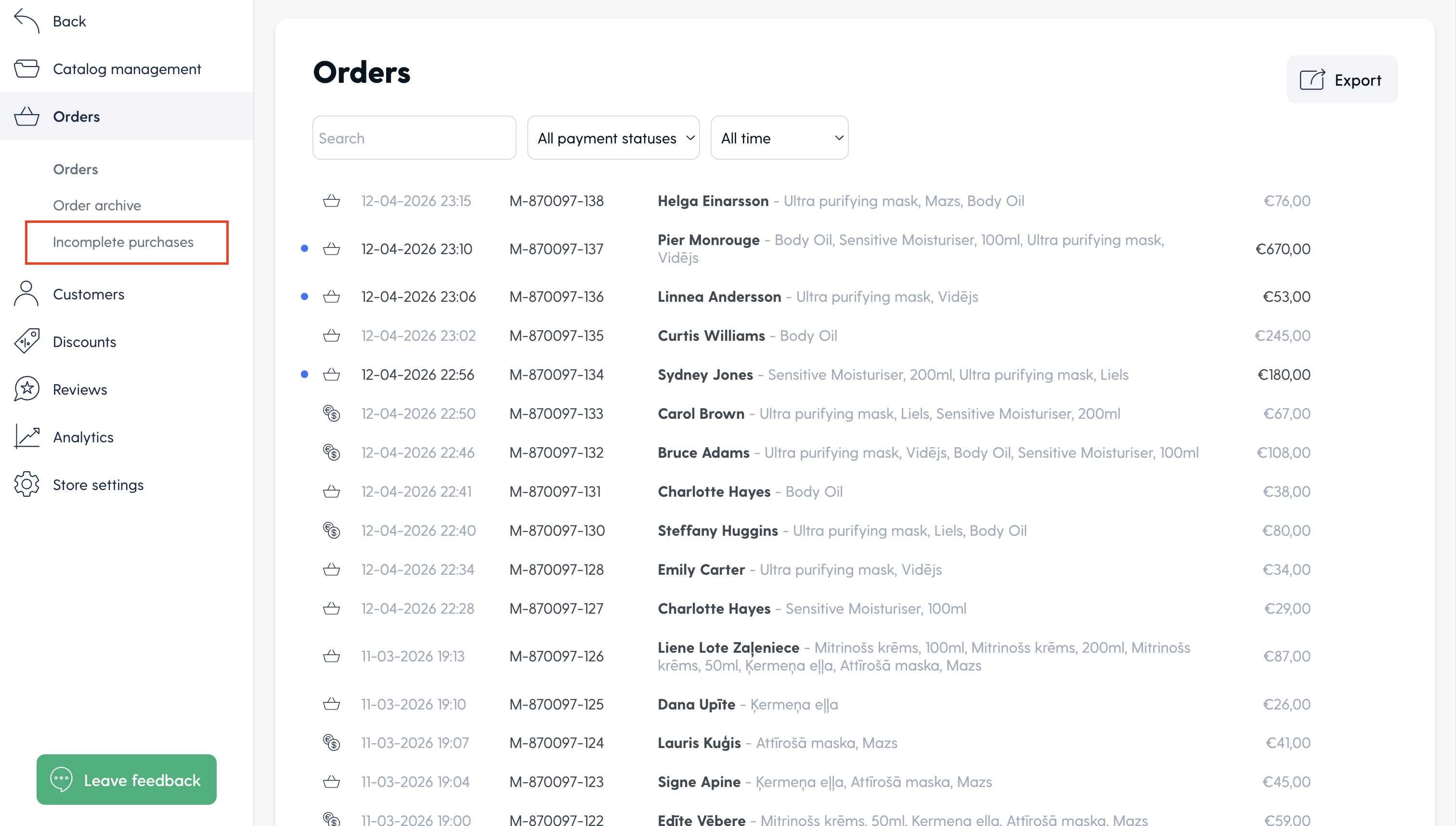
This section shows purchases that were started but not completed. It gives you a useful overview of abandoned checkouts in your online store, so you can see how often shoppers reach checkout but leave before paying.
If you are using the Mozello Premium Pro plan, you can use this section together with abandoned cart recovery reminders. The list shows whether a reminder email was sent, whether the order has been reclaimed, and the current status of the incomplete purchase. You can also click an incomplete purchase to view more information about the order.
If you have not upgraded to Premium Pro, you can still see the incomplete purchases list, but the recovery options are limited. You will not be able to use the abandoned cart recovery reminders or open incomplete purchases to view full order details.
You can check incomplete purchases under Store → Orders → Incomplete purchases.
If you have any questions about abandoned cart recovery in Mozello, please contact our support team at support@mozello.com.
So, do abandoned cart reminders actually work?
No abandoned cart recovery feature can promise the same result for every store. Your results will depend on your products, prices, checkout experience, email timing, customer trust, and even the season.
But ecommerce benchmarks show that abandoned cart emails can make a real difference for your business.
Klaviyo’s abandoned cart benchmark report, based on more than 143,000 abandoned cart flows, found an average placed order rate of 3.33% for abandoned cart flows. Top-performing brands reached 7.69%. Dynamic Yield by Mastercard also reports that about one third of clicks on emails sent after cart abandonment lead to a purchase.
These numbers should not be read as a guarantee. A new small store will not automatically perform like an optimized ecommerce brand with a large audience. But they do show that abandoned cart reminders are not just “nice to have.” They can bring back shoppers who were already close to buying.
Even a small recovery rate can matter. If your store has 30 abandoned carts in a month and one or two customers return because of a reminder, that is revenue you may have otherwise lost. For a small business, those small wins add up.
What should an abandoned cart reminder say?
A good abandoned cart reminder should sound like a helpful note, not a sales alarm.
You do not need to write a long email. In most cases, the customer already knows the product. The reminder only needs to show what they left behind, make returning easy, and answer any small doubt that may be stopping them.
- A clothing store might mention sizing help.
- A handmade jewelry shop might mention materials or delivery.
- A bakery selling gift boxes could keep the message warm and simple.
- A digital product seller could remind the customer that the download will be available right after purchase.
The tone matters. A message like “Your selected items are still waiting” feels much better than “Complete your order before it’s too late!” unless there is a real reason for urgency, such as limited stock or a sale ending.
Keep it friendly. Keep it clear. Make the next step obvious.
Should you offer a discount?
A discount can help, but it should not be your first answer to every abandoned cart.
Sometimes shoppers leave because the price feels too high. In that case, a small discount or special offer may help them decide. This can work well for seasonal campaigns, first-time buyers, or higher-value carts where you have enough margin.
But many shoppers do not need a lower price. They need clearer shipping information, reassurance about returns, better product details, or simply a reminder because they got distracted.
There is also a small risk with offering discounts too often: customers may learn to wait for them. If every abandoned cart email includes a discount, some shoppers may start leaving carts on purpose because they expect a better offer later.
A practical approach is to keep the first reminder simple. If the order is still unfinished, a second reminder with a small offer can make sense, depending on your business.
Make sure the checkout itself is not the problem
Abandoned cart reminders are useful, but they cannot fix a checkout that feels confusing or untrustworthy.
If many shoppers leave before paying, it is worth looking at your online store from the customer’s point of view. Are shipping costs clear before the final step? Does checkout work well on mobile? Are product descriptions helpful? Are payment options easy to understand? Is your return policy visible? Does your website look trustworthy?
The reminder can bring people back, but your store still needs to help them feel confident enough to finish the order.
This is why abandoned cart recovery works best together with a simple checkout, clear product information, and a website that feels reliable.
A simple reminder can make online selling easier
Abandoned cart recovery is not magic. It will not turn every unfinished cart into a completed order, and it will not replace good products, fair prices, clear shipping information, or a trustworthy website.
But it can help you make better use of the visitors you already have.
That matters because getting people to your website takes time. Whether they come from social media, search engines, word of mouth, ads, or repeat visits, every interested shopper is worth paying attention to. When someone reaches the cart stage, they have already shown real interest. If they leave, a simple reminder gives them an easy way back.
This is why abandoned cart recovery is a useful feature when you create an online store. A good website builder should not only help you publish pages and add products. It should also help with the small but important moments that happen after someone starts shopping.
For small business owners and solo entrepreneurs, Mozello’s abandoned cart recovery reminders offer a practical way to follow up automatically. You set up the reminder, choose the timing, adjust the message, and let your online store do the follow-up.
Sometimes, that simple reminder is exactly what turns an almost-sale into a completed purchase.
A better next step
If you already have an online store with Mozello, now is a great time to enable abandoned cart recovery and give unfinished orders a second chance.
And if you are still thinking about starting your online store, look no further. With Mozello, you can create a professional website or online store quickly and easily, without programming or technical hassle.
Build your online store with Mozello, enable the right tools, and turn more interested visitors into customers.
Frequently asked questions about abandoned cart recovery
What is abandoned cart recovery?
Abandoned cart recovery is a way to remind shoppers about products they added to their cart but did not purchase. It usually works through automatic reminder emails that help customers return to checkout.
How do abandoned cart reminders work in Mozello?
Mozello can automatically send reminder emails to buyers who started checkout but did not complete their payment. The reminders can show the products left in the cart and help the customer return to finish the order.
Where can I enable abandoned cart recovery in Mozello?
You can enable and customize abandoned cart recovery reminders under Store → Store settings → E-mails.
How do I add a discount to an abandoned cart reminder?
First create a discount code under Store → Discounts. Then add the code manually to the Text at the beginning of the first incomplete purchase reminder e-mail or Text at the beginning of the second incomplete purchase reminder e-mail field.
Where can I check incomplete purchases in Mozello?
You can check incomplete purchases under Store → Orders → Incomplete purchases. All store owners can see the list of unfinished purchases, but abandoned cart recovery reminders and full incomplete purchase details are available only with the Mozello Premium Pro plan.
Is abandoned cart recovery available in all Mozello plans?
No. Abandoned cart recovery reminders are included in the Mozello Premium Pro plan.
How many abandoned carts can recovery emails bring back?
There is no fixed percentage for every store. Results depend on your products, prices, checkout experience, email timing, and customer trust. However, ecommerce benchmarks show that abandoned cart emails can recover some unfinished purchases, which is why they are worth using even for smaller online stores.
Should I include a discount in abandoned cart reminders?
You can, but you do not always have to. A simple reminder, clearer delivery information, or helpful customer support can sometimes be enough. Discounts should be used carefully so customers do not learn to wait for them.
What should I do if I have questions about the feature?
If you have any questions about abandoned cart recovery in Mozello, please contact our support team at support@mozello.com.