
How to choose website colors: A simple guide
When you decide to create a website for your business, what is the very first thing that comes to mind? For many entrepreneurs, it’s the logo, the layout, or the products they want to sell. However, there is one crucial element that often gets overlooked until the very last minute: color.
Colors are everywhere, and all of them trigger specific, hardwired associations within us. Research consistently shows that colors can profoundly impact a visitor's mood, their actions, and ultimately, their decision-making. That is exactly why we suggest you pay serious attention to your color choices when you build your online presence. Your color palette is not just a decorative afterthought; it should be considered a foundational pillar of your brand identity.
Think about global giants like Facebook, Coca-Cola, or McDonald's. These brands have meticulously integrated their color palettes into their visual identity, making them instantly recognizable worldwide. But you don't need a massive corporate budget to achieve this. With the right website builder for small business, you can harness the exact same psychological principles to connect with your target audience, build trust, and develop a business that stands out from the competition.
In this comprehensive guide, we are going to explore why website colors matter, decode the psychology behind common shades, and show you exactly how to choose the perfect palette when you create your own website.
Why website colors matter for small business
In the digital world, first impressions happen in a fraction of a second. Before a visitor reads a single word of your carefully crafted copy or clicks on a product, their brain has already processed the visual design of your small business website.
Color communicates instantly. Every brand must decide on a color palette that clearly communicates who they are, what values they hold, and what message they are trying to convey. If your colors clash or send the wrong psychological signals, visitors may subconsciously feel that your business is untrustworthy, outdated, or misaligned with their needs. Conversely, a harmonious and strategic color palette can make your brand feel professional, authoritative, and welcoming.
When you use a DIY website builder, you have the creative freedom to select colors that reflect your unique identity. A standard color palette usually consists of a primary color—which serves as the dominant voice of your brand—supported by two to four secondary colors that complement it. While this sounds incredibly simple on the surface, achieving the right balance requires a bit of strategic thinking. Every color has its distinct characteristics and should serve a specific purpose in your website design. Your logo, key visual materials, and main headlines should feature your primary color, while background elements, borders, and supportive text should utilize your secondary colors.
The psychology of website colors
To help you decide which colors to choose when you build a website, we have broken down the most common shades and the psychological associations they carry. Understanding these underlying meanings will allow you to align your website design for small business with the expectations of your target audience.
White
White is the ultimate symbol of simplicity, light, purity, and hope. In web design, white is often the unsung hero. It is the foundation of "white space" (or negative space), which gives your content room to breathe. Minimalist brands, tech companies, and modern healthcare providers frequently use white to communicate cleanliness and efficiency. If you want your products or portfolio to be the absolute center of attention, using a predominantly white background is an incredibly effective strategy.
Black
Black exudes glamour, security, wealth, and sophistication. It is a powerful, bold color that commands respect. Luxury brands, high-end fashion retailers, and exclusive consulting firms often rely on black to convey a sense of premium quality and timeless elegance. When you create a website aiming for a sleek, modern, and highly professional aesthetic, using black as a primary color or a dominant background can make your imagery pop and give your brand an exclusive feel.
Blue
Blue is perhaps the most universally loved color in web design, and for good reason. It represents efficiency, intelligence, professionalism, calm, cleanliness, and, above all, trust. Banks, tech companies, and corporate service providers lean heavily on blue because it makes visitors feel secure. If your small business relies on building long-term trust—such as financial consulting, home security, or medical services—blue is an exceptionally safe and powerful choice.
Green
Green is intrinsically linked to health, money, growth, balance, peace, and the environment. It is the color of nature and vitality. If you are launching an organic skincare line, a landscaping business, or a financial advisory firm, green naturally communicates prosperity and eco-friendliness. Furthermore, green is universally recognized as the color of "go" or "success," making it an excellent choice for confirmation messages and positive notifications on your site.
Red
Red is a color of extremes. It signifies passion, warmth, love, strength, excitement, heat, energy, and sometimes danger. It literally raises the heart rate. Red is brilliant for drawing immediate attention, which is why it is frequently used for clearance sales, urgent alerts, and fast-food chains (as it is known to stimulate appetite). When you learn how to create a website, you will discover that red makes a fantastic accent color for buttons or limited-time offers, but it should be used sparingly so it doesn't overwhelm your visitors.
Yellow
Yellow shines with hope, fun, sunlight, creativity, confidence, friendliness, and optimism. It is an incredibly energetic color that catches the eye immediately. However, it can also signal caution (think of traffic signs). Because of its high visibility, yellow is fantastic for brands wanting to appear youthful, accessible, and innovative. Use it to highlight key features or free shipping banners, but ensure it is paired with darker, contrasting colors so your text remains readable.
Orange
Orange combines the fierce energy of red with the cheerful optimism of yellow. It communicates warmth, happiness, fun, excitement, and approachability. Orange is less aggressive than red but still highly effective at driving action. It is a popular choice for e-commerce platforms, fitness brands, and creative agencies. If you want to encourage visitors to subscribe, buy, or sign up without feeling too pushy, an orange Call-To-Action (CTA) button is a proven winner.
Purple
Purple has long been associated with luxury, creativity, quality, wisdom, and royalty. Because it rarely occurs in nature, it feels unique and slightly mysterious. Beauty brands, creative agencies, and high-end lifestyle products often use purple to stand out from the crowd and convey a sense of exclusivity and imagination. A deep plum can feel incredibly sophisticated, while a lighter lavender brings a soft, romantic, and soothing vibe.
Pink
Pink represents femininity, sympathy, health, love, and gentleness. Over the years, pink has evolved from a strictly gendered color into a versatile shade used by modern, disruptive brands to show they are playful and approachable. Whether you are selling baked goods, modern cosmetics, or offering creative coaching, pink can add a warm, inviting, and highly stylized touch to your digital presence.
Grey
Grey is the master of neutrality. It signifies elegance, respect, wisdom, and balance. Sitting right between black and white, grey is often used as a foundational color in modern web design. It doesn't compete for attention, making it the perfect background shade for corporate websites, photography portfolios, and tech startups. Light grey backgrounds provide a softer alternative to stark white, reducing eye strain while maintaining a clean layout.
Brown
Brown communicates calm, reliability, nature, tradition, and richness. It is a grounding, earthy color. Small businesses that deal in artisanal goods, coffee, leather products, or outdoor gear frequently use brown to convey ruggedness and authenticity. It feels warm and traditional, signaling to customers that your brand is dependable, experienced, and rooted in reality.
How to choose the right color palette for your website
Now that you understand what different colors mean, how do you actually combine them when you build a website? Choosing a palette might seem daunting, but by following a few simple rules, you can achieve a professional look without needing a degree in graphic design.
Primary vs. secondary colors
Start by choosing your primary color. This should be the color most closely associated with your brand identity and logo. It is the color that people will remember you by. Once you have your primary color, select two to three secondary colors. These will be used for backgrounds, text, and supporting elements.
Limit your palette to 2–4 colors
One of the most common mistakes beginners make is using too many colors. The brighter and more colorful the site is, the better it performs, right? Not exactly. Every business has a specific message and tone to communicate, and a chaotic mix of colors will only confuse your visitors. We highly recommend limiting your palette to a maximum of four colors: one dominant primary color, one or two secondary colors, and one highly contrasting accent color.
Prioritize contrast and readability
A beautiful color palette is useless if your visitors cannot read your text. Always ensure there is a high contrast between your background colors and your text colors. Dark grey or black text on a white or light-grey background is the gold standard for readability. If you are using a dark background, ensure your text is pure white or a very pale tint of your secondary color.
Using color for calls-to-action (CTAs)
Your accent color should be reserved almost exclusively for your most important interactive elements: your Call-to-Action (CTA) buttons. Whether you want a visitor to "Buy Now," "Subscribe," or "Contact Us," that button needs to stand out from the rest of the page. If your website is mostly blue and white, a bright orange or yellow CTA button will naturally draw the eye and encourage clicks.
Avoid overly bright or distracting palettes
Saturated and bright colors have powerful psychological associations. However, you must be careful not to go over the top. A little bit too much saturation, and your chosen color tone becomes distracting and visually unpleasant. Don't be afraid to use neutral, dark, or tinted colors—they are often better suited for communicating a serious, professional message than a page covered in neon.
Examples of color strategies that work
If you need some inspiration before you create your own website, here are a few proven color strategies that consistently deliver great results for small businesses:
Neutral + accent color
This is a foolproof strategy for a clean, modern aesthetic. The majority of the website utilizes white, light grey, and charcoal text. A single, bold accent color (like an electric blue or a vibrant green) is used sparingly for logos, links, and buttons. This strategy focuses the user's attention exactly where you want it.
Dark palette with vibrant highlights
Using dark backgrounds (deep greys, navy, or black) paired with a bright, luminous accent color (like neon green, bright orange, or hot pink) creates a highly premium, cutting-edge look. This is a brilliant way to create a stunning color palette by combining muted tones with saturated highlights. For example, using saturated colors to emphasize the most important information or lead to action on a dark background can make your products look incredibly sleek and high-tech.
Minimal palettes for professional brands
Law firms, accountants, and consultants often do best with highly restrained palettes. A combination of deep navy blue, crisp white, and a subtle slate grey communicates trust, efficiency, and intelligence without any unnecessary visual noise.
How to create your website color palette in Mozello
When you choose a website builder for small business like Mozello, setting up your perfect color palette is incredibly fast, stress-free, and requires absolutely no coding or design experience. We have built our platform specifically to help entrepreneurs focus on their business rather than getting lost in technical details.
To customize your colors in Mozello, simply follow these steps:
- Navigate to the Design section in your Mozello control panel.
- Click on Change Colors.
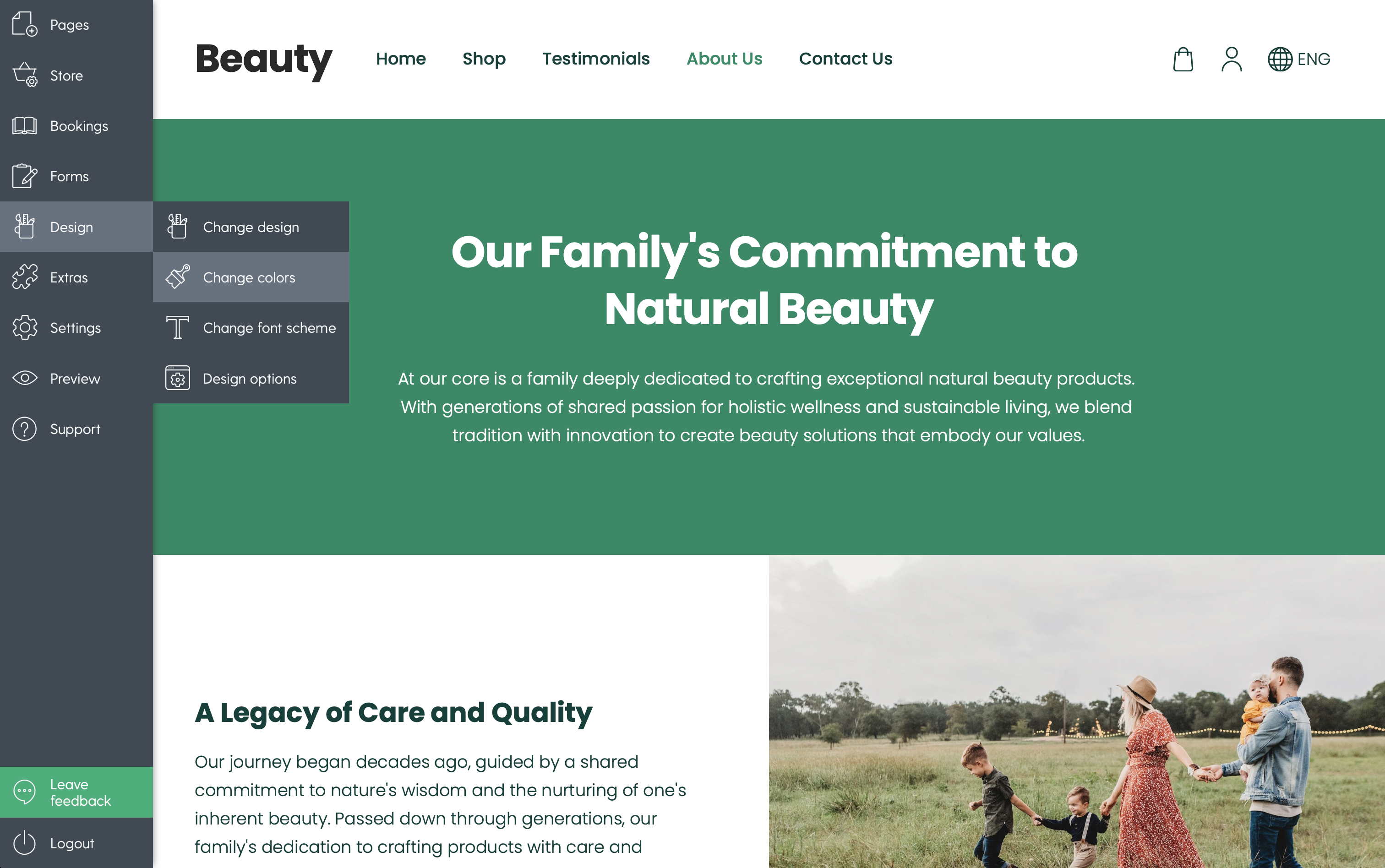
From here, you will see that all our design templates come with beautifully pre-defined color palettes tailored by professional designers. You can simply click through these options to see which one instantly aligns with your brand identity.
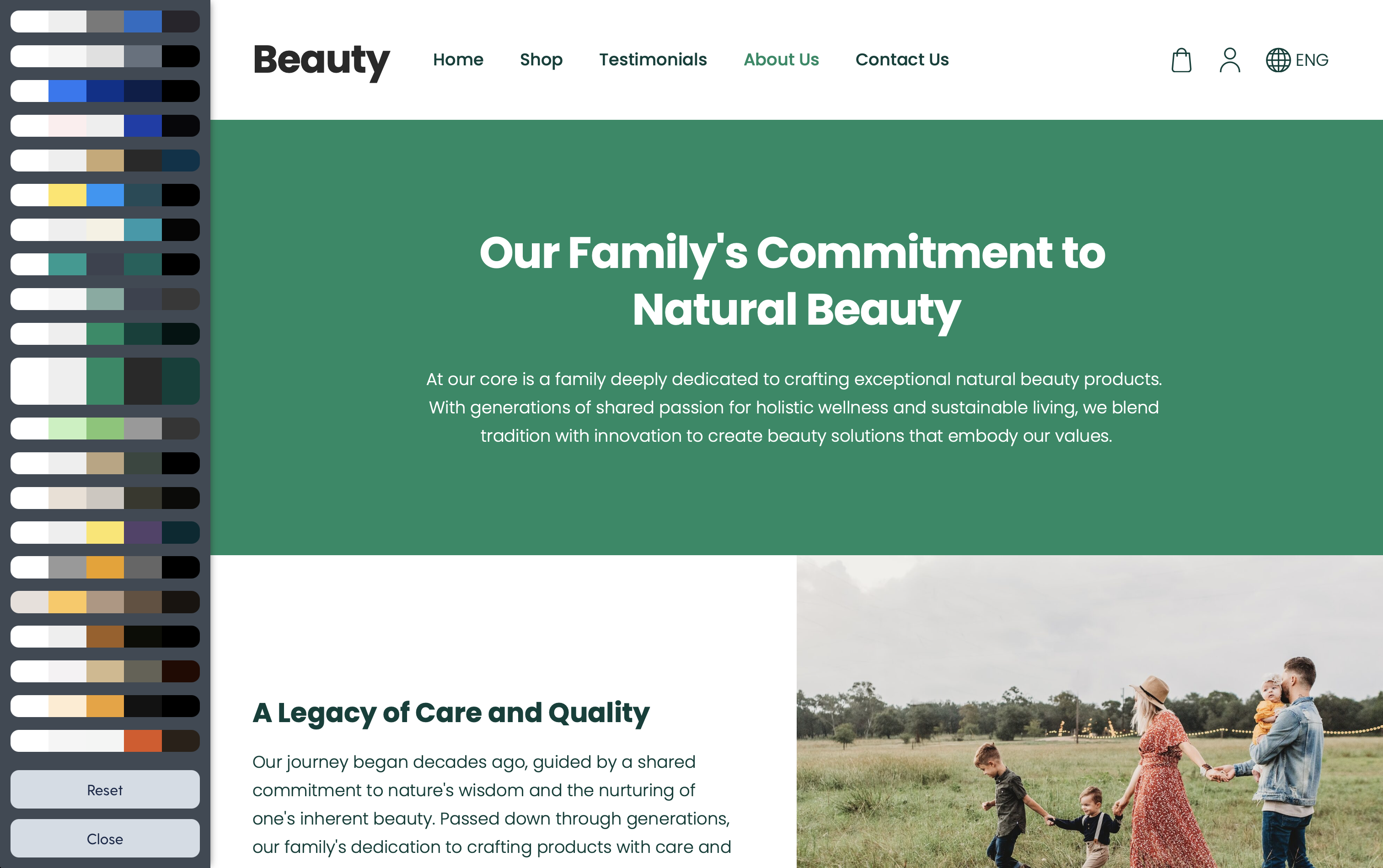
If you want to add a spice of your own unique identity, you can easily edit these palettes. Just click on the Advanced options. This menu allows you to fine-tune specific elements - such as your background, heading text, and button colors—to exactly match your logo or brand guidelines. Mozello makes it remarkably easy to build a website that looks perfectly tailored to your vision, allowing you to develop a business with confidence and style.
Tips for small business owners creating their first website
If you are just starting out and learning how to create a website, keep these practical tips in mind to ensure your color strategy is a success:
-
Keep the Design Simple: When in doubt, use fewer colors. A clean, simple layout always looks more professional than a cluttered, overly colorful one. Let your product photos and written content do the heavy lifting.
-
Maintain Consistent Colors: Once you define your palette in Mozello, stick to it. Consistency builds brand recognition. Do not use a different shade of blue on your contact page than you used on your homepage.
-
Make Buttons Stand Out: Always use your highest-contrast accent color for buttons. Your visitors should never have to search for the "Checkout" or "Send Message" buttons.
-
Test Your Design on Mobile: Colors and contrast can look different on a mobile screen out in the bright sunlight. Always preview your small business website on a smartphone to ensure your text remains highly readable.
Conclusion
The colors you choose when you build your online presence do much more than just make your pages look pretty. They are a powerful form of non-verbal communication that instantly tells your visitors who you are, what you stand for, and whether they should trust you. By understanding the psychology of color and sticking to basic design principles like contrast, simplicity, and consistency, you can create a digital experience that resonates deeply with your target audience. A great color palette, combined with your unique message, will impact how visitors perceive your information and heavily influence whether they take your desired action.
Are you ready to bring your brand to life with the perfect design? Create your own website or online store with Mozello today.
It is fast, incredibly easy to use, and packed with all the tools you need to launch a beautiful, professional, and SEO-friendly site. Join the thousands of entrepreneurs who have successfully used our platform to develop a business they are proud of.